|
<< Click to Display Table of Contents >> Render a Video |
  
|
|
<< Click to Display Table of Contents >> Render a Video |
|
Open the Video-Rendering tool in the main toolbar of Realizzer.
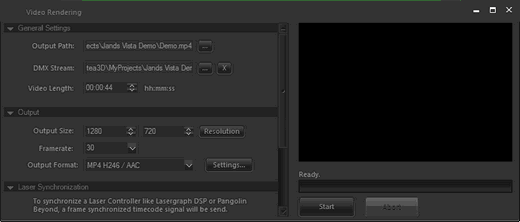
Output Path:
Here you can define the output file where the video will be saved and also predefine the format.
DMX-Stream:
Here you can input your recorded DMX-Stream file as descripted in DMX-Stream. If you want to render without DMX-Signal leave this field empty.
Video-Length:
This field defines the full length of the Output-Video file. If you load in a DMX-Stream, the length will be automatically set to the duration of the stream.
Output Size:
Defines the Video resolution which should be mostly in 16:9 or 4:3. Other resolutions are possible but can cause problems on several media players.
Framerate:
Defines the Video-Framerate of the Output-Video file.
Output Format:
Same as in Output-Path dialog here you can also decide between JPEG, MP4 H264, WMV or AVI. To change the detailed settings click on "Settings..."
As explained in DMX-Stream the Video-Rendering is not running in realtime, so also the Laser-Signal haves to be synchron with the frames are rendered. For that reason the Lasergraph DSP and Pangolin Beyond supports Ethernet Timecode format NTC and SNTC.
You can also add any Audio-File to your Video. The Start-Position will define where the Audio will starts to play.